StitchSketchEx User Manual
The Chart Editor
Useful Mouse/Key operations:
- Mouse Wheel: Vertical Scroll
- Mouse Wheel + Shift Key: Horizontal Scroll
- Mouse Wheel + Ctrl Key: Zoom
- Mouse + Space Key: Pan
- Ctrl + Z (Cmd + Z): Undo
- Ctrl + Shift + Z (Cmd + Shift + Z): Redo
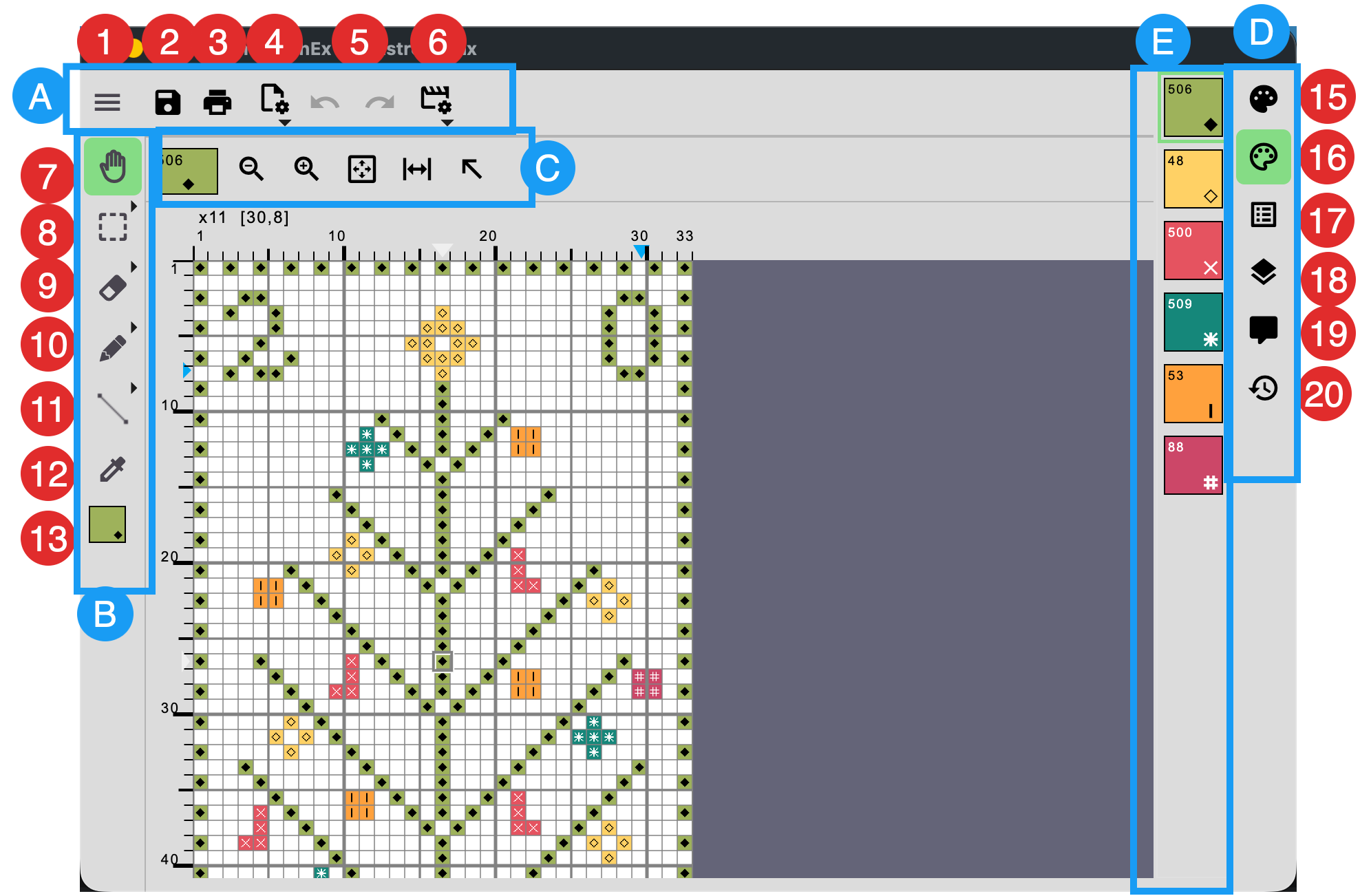
- Top menu bar
- Tool bar
Tool options bar
The buttons in this bar depend on the selected toolbar tool.- Sidebar buttons
Sidebar section
This section changes depending on the selected sidebar button.
Top menu
- File menu
- Save
- If the file has been modified, a
*symbol is shown next to the icon. - If the chart does not have a file name yet, a file save dialog box appears.
- If the file has been modified, a
- Print Preview
- Chart operation (a popup menu)
- Undo/Redo
- View Option (a popup menu)
Toolbar
Click a tool to select it. Click the selected tool again to show an additional popup menu with related tools.
- Hand Tool
- Selection Tool
- Eraser
- Drawing Tool
- Backstitch/Vector Drawing
- Color Picker
- Current drawing color