StitchSketchEx User Manual
File Menu
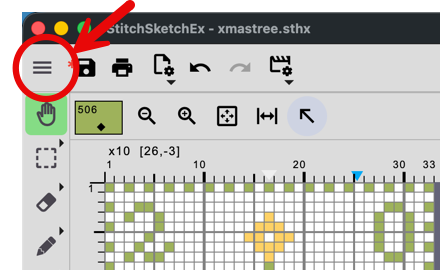
The hamburger menu is the “File Menu”.
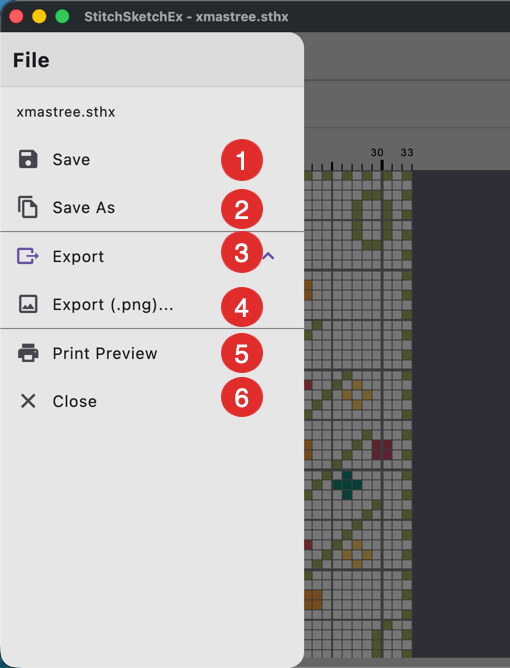
- Save - save the chart. If it has not been saved yet, a file save dialog box appears.
- Save As - save the chart with a new file name. A file save dialog box appears.
- Export - open the export section.
- Export the chart as a PNG file (see below)
- Print Preview
- Close the edit screen and end editing.
If the chart is not saved, a save dialog appears.
Export as PNG
A popup dialog box lets you choose how the PNG image is generated.
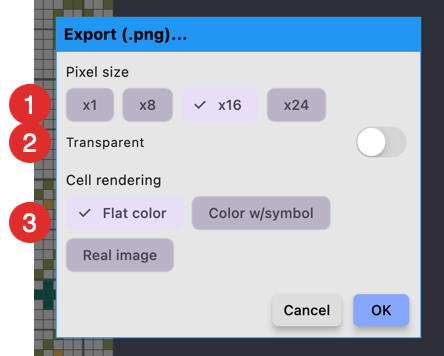
- Select the pixel size of each cell.
- Use transparency. Background and non-drawing pixels will be transparent.
- Pixel fill option. “Color w/Symbol” and “Real image” are available only if the pixel size is 16x or larger.
After you click “OK”, a file save dialog box appears so you can choose the folder location and file name.