StitchSketchEx User Manual
Hand Tool
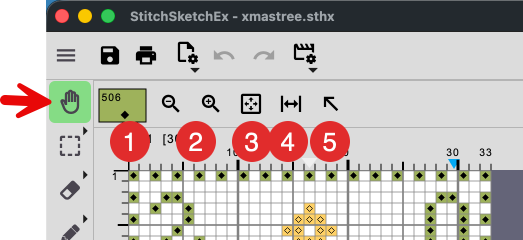
- Current color: Click it to change it.
- Zoom Out/In
- Fit the entire chart in the view area
- Fit the chart width in the view area
- Move the chart’s top left to the view area’s top left
Useful Mouse/Key operations:
- Mouse Wheel: Vertical Scroll
- Mouse Wheel + Shift Key: Horizontal Scroll
- Mouse Wheel + Ctrl Key: Zoom
- Mouse + Space Key: Pan. This works on any screen.