StitchSketchEx User Manual
Preview Print/PDF
-
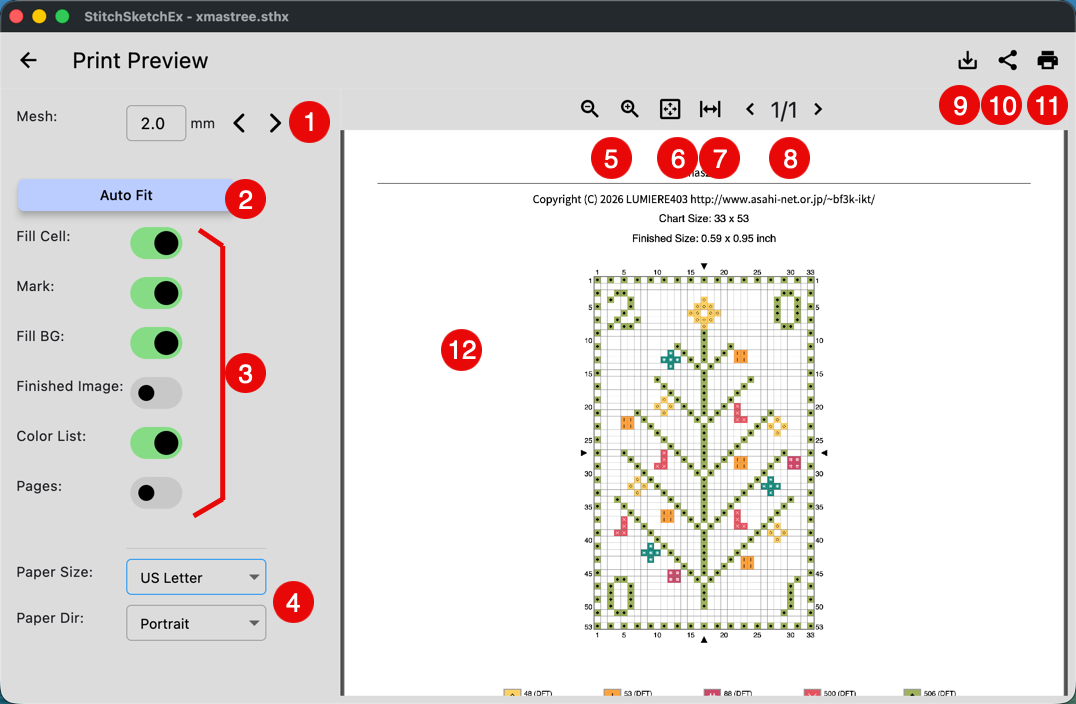
Mesh size
-
Auto fit button Automatically calculate the mesh size so the entire chart fits on one page.
-
Options:
-
Fill cell
Fill the cell with color. -
Mark
Show marks in the cells. -
Fill BG
Fill the background of the chart. -
Finished image
Generate a finished image on page 1. -
Color List
Generate a color list. -
Pages
Use this option to print specific pages. You can enter pages such as1,2,3.
-
-
Paper Size/Orientation
-
Zoom in/out
-
Fit the paper to the viewing box
-
Fit the width to the viewing box
-
Move pages
-
(Desktop)Save as PDF, (mobile)Share the PDF
-
Share - open the OS share sheet
-
Print - open the OS print dialog box
-
Preview section