StitchSketchEx User Manual
View Option Menu
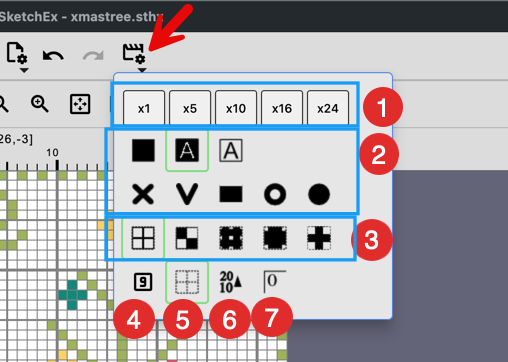
This button opens a popup menu for display-related settings in the chart editor.
Use this menu to change how the current chart is shown while you work.
- Preset Zoom Level
- To change the zoom level:
a. “Pan” tool -> zoom +/- buttons
b. Mouse wheel + Option key
- To change the zoom level:
- Cell Drawing Mode.
- Fill color w/o symbol
- Fill color w/ symbol (default)
- Symbol only, w/o color fill
- Real image: Cross Stitch
- Real image: Knitting (V shape)
- Real image: Beads
- Real image: Iron Beads
- Real image: Peg (Color Filled Circular shape)
- Background Drawing Mode
- Grid (default)
- Transparency Grid
- Real image: Linen
- Real image: Aida
- Real Image: Canvas
- Show sequence numbers instead of marks (symbols)
- Grid visibility on/off
- Change the ruler direction (ascending/descending)
- Start the ruler at 0 instead of 1